May 25, 2026
Blog PostBest AI Tools for Business in 2026
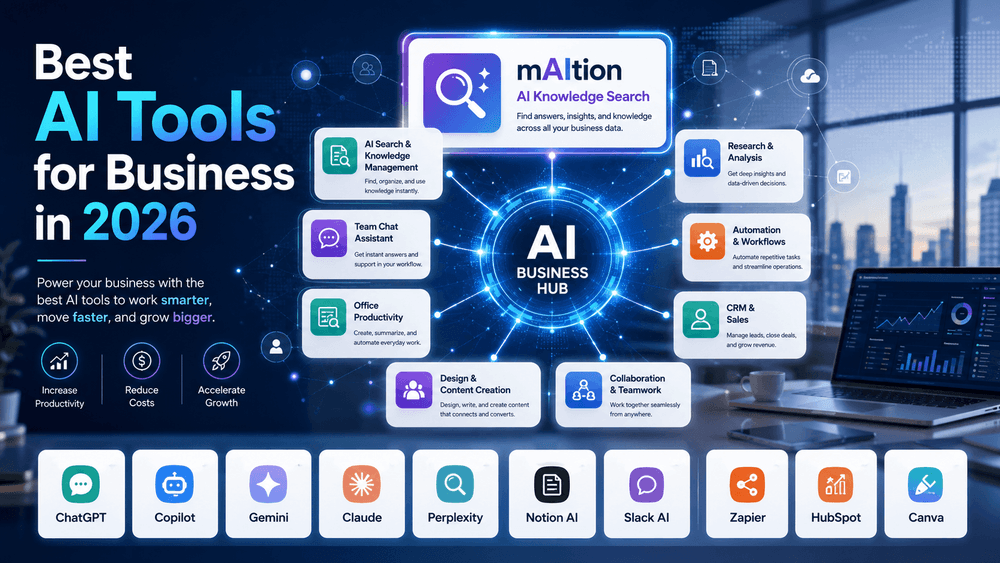
Artificial intelligence has moved from being a “nice to have” experiment to a practical business layer that sits inside daily work. In 2026, the best AI tools are not just chatbots. They help teams search internal knowledge, summarize meetings, automate repetitive work, create content, analyze data, support customers, and turn scattered information into usable answers.
The right AI tool depends on where your business already works. A company built around Microsoft 365 may get the most value from Microsoft Copilot. A team drowning in internal documentation may need an AI search platform like mAItion. A sales and marketing team may benefit more from HubSpot Breeze or Canva AI. The goal is not to use every AI tool available. The goal is to choose the tools that remove the most friction from your actual workflows.
Below are some of the best AI tools for businesses in 2026, organized by what they do best.
1. mAItion: Best for AI-Powered Knowledge Search Across Business Systems
One of the biggest problems businesses face is not a lack of information. It is that the information is scattered everywhere. Important answers may live in Jira, Confluence, Notion, MediaWiki, Google Drive, Slack, S3, or other internal systems. Employees waste time searching, asking coworkers, or recreating work that already exists.
mAItion is built to solve that problem. It is an AI-powered platform that combines existing business knowledge with large language models, giving teams a single chat interface to search and interact with their data. Its documentation describes connectors for Jira, Confluence, Notion, S3, MediaWiki, search sources, and more, with access through integrations such as Slack, Microsoft Teams, Open WebUI, and other front ends.
The key value of mAItion is that it focuses on internal knowledge retrieval, not just general AI chat. A business can use it to ask questions like “What is our process for handling this client request?” or “Where is the latest documentation for this system?” and receive answers grounded in connected sources. Its documentation also highlights citation-backed answers for traceability and scheduled ingestion to keep knowledge current.
mAItion is especially useful for organizations with complex documentation environments, technical teams, knowledge bases, wikis, tickets, and file systems. Instead of forcing employees to remember where something lives, it gives them one place to ask.
Best for: internal knowledge search, AI-powered documentation access, knowledge management, engineering teams, support teams, and organizations trying to break down information silos.
2. ChatGPT Business: Best General-Purpose AI Assistant for Teams
ChatGPT Business is one of the strongest all-around AI tools for companies that want a flexible assistant for writing, research, analysis, coding, brainstorming, and internal productivity. OpenAI describes ChatGPT Business as a shared workspace with admin controls and apps for company tools, with access to advanced models and capabilities such as deep research and Codex.
For business users, ChatGPT is useful because it can support many departments without being limited to one workflow. Marketing teams can draft campaigns, sales teams can refine outreach, managers can summarize notes, developers can use coding assistance, and operations teams can create process documents.
In 2026, one of the bigger shifts is the move toward AI agents. OpenAI’s release notes describe Workspace Agents for ChatGPT Business and Enterprise, which can help organizations build repeatable workflows, connect to apps, run inside ChatGPT or Slack, and run on a schedule.
ChatGPT Business is a strong first AI tool for many companies because it is broad, easy to adopt, and useful across many roles. However, companies still need to define internal policies around what data employees can share, how outputs should be reviewed, and where ChatGPT fits compared with more specialized tools.
Best for: writing, research, coding help, business analysis, brainstorming, workflow agents, and broad team productivity.
3. Microsoft 365 Copilot: Best for Companies Already Using Microsoft 365
Microsoft 365 Copilot is a natural fit for businesses that already live in Word, Excel, PowerPoint, Outlook, Teams, and SharePoint. Microsoft describes Copilot as AI-powered chat connected to work and web data, with access inside Microsoft 365 apps and AI-powered search across work data using more than 100 connectors.
The biggest advantage is context. Copilot can work with the emails, meetings, chats, files, and documents that already exist inside the Microsoft ecosystem. That makes it useful for drafting emails, summarizing meetings, building presentations, analyzing spreadsheets, and finding information across Microsoft Graph.
Microsoft also emphasizes enterprise data protection, stating that prompts and responses stay within the Microsoft 365 service boundary and are not used to train the underlying large language models.
Copilot is not always the cheapest option, and it works best when a company’s Microsoft data is well organized. If SharePoint permissions are messy or documents are outdated, Copilot can surface that mess faster. But for Microsoft-heavy organizations, it is one of the most practical AI platforms available.
Best for: Microsoft 365 users, office productivity, meetings, email, documents, spreadsheets, and enterprise workflows.
4. Google Workspace with Gemini: Best for Google-Centric Teams
For businesses built around Gmail, Google Drive, Docs, Sheets, Meet, and Slides, Gemini is Google’s main AI layer. Google Workspace describes Gemini and NotebookLM as business-ready AI tools that help with routine tasks, writing, analysis, meeting notes, and turning files into knowledge.
Gemini in Gmail can summarize conversations, find key details, and help draft professional emails. Gemini in Meet can take meeting notes, while Gemini in Docs, Sheets, Slides, and Drive can support document creation, data work, presentations, and file-based research.
This makes Gemini a strong option for companies that want AI inside the tools employees already use. It is less about replacing workflows and more about reducing the time spent on repetitive writing, summarizing, searching, and organizing.
Best for: Gmail-heavy teams, Google Drive knowledge work, meeting summaries, documents, spreadsheets, and lightweight research.
5. Claude Enterprise: Best for Deep Thinking, Writing, and Governed AI Use
Claude, from Anthropic, is often valued for thoughtful writing, analysis, coding support, and complex reasoning. Anthropic describes Claude Enterprise as a way for organizations to deploy Claude across the workforce with governance, data controls, and admin infrastructure required by enterprise IT and security teams.
Claude is particularly useful for teams that work with long documents, strategy, policy, legal review, product planning, software documentation, and complex internal analysis. Anthropic’s enterprise materials emphasize data controls, auditability, identity management, and the ability to deploy Claude Code and Claude Cowork under an enterprise agreement.
For smaller businesses, Claude may be attractive because it can produce polished writing and handle nuanced questions well. For larger organizations, the enterprise controls matter more.
Best for: long-form writing, strategy, analysis, document review, coding assistance, and organizations that need stronger governance controls.
6. Perplexity Enterprise: Best for Research and Sourced Answers
Perplexity Enterprise is useful for teams that need fast research across the web, files, and work apps. Perplexity describes its enterprise product as a secure platform that orchestrates leading AI models across files and tools for tasks, deep research, and complex projects.
The main benefit is research speed. Instead of manually searching multiple sources, users can ask questions and receive answers with sources. This is useful for market research, competitive analysis, financial research, industry monitoring, and report preparation.
Perplexity’s enterprise pricing page also highlights model choice, deeper sourcing, no training on customer data, and search across web, team files, and work apps.
Perplexity is not a full replacement for internal knowledge management or business process automation, but it is strong when employees need current, sourced information quickly.
Best for: research, competitive intelligence, market analysis, report building, and sourced answers.
7. Notion AI: Best for Teams Managing Projects, Docs, and Knowledge in Notion
Notion AI is a strong choice for teams already using Notion as their workspace. Notion states that AI is included with Business and Enterprise plans, including core features like Notion Agent, AI Meeting Notes, and Enterprise Search.
This makes it useful for companies that manage project plans, meeting notes, internal documentation, content calendars, product roadmaps, or lightweight CRMs in Notion. Instead of jumping between a separate AI tool and the workspace, users can generate, edit, summarize, search, and automate within Notion itself.
Notion’s Custom Agents can also run on schedules or triggers and complete multi-step work across the workspace and connected tools.
Best for: Notion-based teams, project documentation, internal wikis, meeting notes, task planning, and workspace automation.
8. Slack AI: Best for Finding Knowledge Inside Team Conversations
A lot of company knowledge lives in Slack, but it is often buried in channels, threads, and informal conversations. Slack AI helps make that information easier to find. Slack describes its AI features as including search, summaries, translations, meeting notes, and workflow automation.
The strongest use case is answering questions from existing Slack knowledge. Slack says users can ask questions in natural language and receive concise answers based on relevant knowledge already in Slack.
Slack also emphasizes that customer data is not used to train large language models and that AI runs within Slack’s trusted infrastructure.
Best for: Slack-heavy teams, channel summaries, meeting notes, internal Q&A, and reducing repeated questions.
9. Zapier: Best for AI Automation Across Apps
Zapier is one of the most practical tools for connecting AI to business workflows. It supports thousands of apps and lets teams automate processes without needing to build custom software. Zapier describes its platform as supporting AI workflows, AI agents, chatbots, tables, forms, canvas, enterprise functions, and more than 9,000 app integrations.
This is valuable because many AI tools can generate content or answers, but Zapier can help turn those outputs into actions. For example, a business can route leads, summarize support tickets, update a CRM, send follow-up emails, create tasks, or trigger approval workflows.
Zapier is especially useful for small and mid-sized businesses that do not have large engineering teams but still need automation between tools.
Best for: workflow automation, no-code AI agents, app integrations, lead routing, notifications, operations, and repetitive tasks.
10. HubSpot Breeze: Best for Sales, Marketing, and Customer Service Teams
HubSpot Breeze is HubSpot’s AI suite built into its customer platform. HubSpot describes Breeze as a collection of AI tools for marketing, sales, and service teams, designed to help businesses create content, drive leads, close deals, and resolve customer questions faster.
This makes Breeze most useful for companies already using HubSpot CRM. Sales teams can reduce manual research and outreach work. Marketing teams can generate content and campaigns. Support teams can answer customer questions faster without immediately adding more headcount.
The main advantage is that Breeze is connected to customer data inside HubSpot. That makes it more practical than a generic AI writing tool when the task depends on contacts, deals, tickets, campaigns, or customer history.
Best for: HubSpot users, CRM workflows, sales outreach, marketing content, lead generation, and customer support.
11. Canva AI: Best for Business Design and Marketing Content
Canva AI is a strong tool for teams that need professional-looking designs without relying on a full design department for every asset. Canva describes Canva AI 2.0 as a conversational creative partner built across its Visual Suite, supporting design, writing, code, and precise edits to individual elements.
For businesses, Canva AI can help create social media graphics, pitch decks, ads, blog images, presentations, flyers, brand assets, and quick campaign visuals. It is especially useful for marketing teams, small businesses, founders, and non-designers who need to produce polished visuals quickly.
Canva also offers admin controls and privacy settings for teams, businesses, and enterprise users.
Best for: marketing visuals, presentations, social media assets, brand content, ads, and quick design production.
The Best AI Tool Depends on the Job
The best AI tool for your business in 2026 is not necessarily the most popular one. It is the one that fits your workflow.
Use mAItion if your biggest problem is scattered internal knowledge. Use ChatGPT Business if you need a flexible general-purpose assistant. Use Microsoft 365 Copilot or Google Gemini if your team already lives in those ecosystems. Use Claude for deeper reasoning and writing. Use Perplexity for research. Use Notion AI for workspace documentation. Use Slack AI for conversation-based knowledge. Use Zapier for automation. Use HubSpot Breeze for sales and customer workflows. Use Canva AI for fast, professional visual content.
The most successful businesses will not treat AI as a separate tool employees occasionally open. They will connect AI directly to the systems, documents, conversations, and workflows where work already happens.